
Game Overview
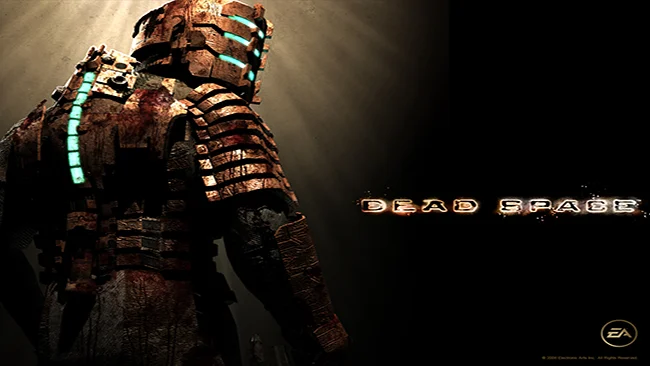
The USG Ishimura turns a routine repair assignment into a suffocating fight through one of sci-fi horror’s most memorable haunted houses. As engineer Isaac Clarke, you arrive at a colossal mining vessel that has gone silent after recovering an alien artifact, then find its corridors packed with mutilated bodies and grotesquely transformed former crew. Dead Space trades military bravado for isolation, industrial grime, and the constant sense that something is moving in the vents. Its horror is harsh and atmospheric, balancing bloody shocks with a bleak mystery surrounding the ship, its religiously charged crew, and the source of the outbreak.
Isaac survives by repurposing engineering tools into weapons, cutting Necromorph limbs apart rather than simply aiming for headshots. That dismemberment system gives every encounter a tactical edge: enemies crawl, charge, and mutate in ways that force you to manage ammunition, positioning, and panic under pressure. Exploration moves between damaged engines, medical wings, cargo bays, and zero-gravity maintenance areas, with keycards, circuit rerouting, puzzles, and upgrades steadily opening more of the Ishimura. Limited supplies and deliberately weighty movement keep combat tense, while upgrade benches let you improve weapon damage, suit durability, stasis slow-down power, and telekinesis utility.
What makes Dead Space endure is the way nearly every system serves its setting, from the holographic inventory projected in real time to the absence of a conventional HUD. Audio design does enormous work, filling quiet hallways with distant scraping, broken machinery, whispers, and sudden screams that make even backtracking unnerving. The ship feels like a coherent place instead of a sequence of levels, and its environmental storytelling reveals a disaster that grows more disturbing the deeper Isaac goes. Fans of Resident Evil 4-style survival action, Alien, and Event Horizon find plenty to love, while horror newcomers should expect a demanding, deliberately stressful classic rather than an easygoing shooter.
Screenshots
Installation
- Select the Download button at the top of this page to open UploadHaven.
- On UploadHaven, wait for any countdown, then select Free Download. Optional: UploadHaven Pro for faster downloads.
- When complete, extract the archive to a Dead Space folder using 7-Zip.
- Open the extracted folder and start the game normally.
- For errors, check Setup Guide & Troubleshooting below. Keep your security software enabled.
System Requirements
- Supported OS: Microsoft Windows® XP SP2 or Vista
- Processor: 2.8 GHz or faster
- Memory: 1 GB RAM or more for Windows XP (2 GB for Vista)
- Graphics: DirectX® 9.0c compatible video card, Shader Model 3.0 required, 256 MB or better, NVIDIA GeForce 6800 or better (7300, 7600 GS, and 8500 are below minimum system requirements), ATI X1600 Pro or better (X1300, X1300 Pro and HD2400 are below minimum system requirements)
- Hard Drive: 7.5 GB free space
- Sound: DirectX® 9.0c compatible sound card
Setup Guide & Troubleshooting
How do I fix missing DLL errors for Dead Space?
After extracting Dead Space, navigate to the _Redist or _CommonRedist folder inside the game directory and install DirectX, Vcredist, and any other dependencies included.
What should I do if the downloaded file is corrupted?
The full archive is 6.44 GB — make sure your download completed fully before extracting. Use 7-Zip to extract the files. If you still see a "file corrupted" error, re-download and try again.
Do I need to run the game as administrator?
Usually, no. Start the game normally from the extracted folder. If you see a permissions or save error, check that the folder is writable and follow the game's documented fix. Only grant administrator access when a trusted game's specific setup requires it.
How do I update my GPU drivers for this game?
Dead Space requires a DirectX® 9.0c compatible video card, Shader Model 3.0 required, 256 MB or better, NVIDIA GeForce 6800 or better (7300, 7600 GS, and 8500 are below minimum system requirements), ATI X1600 Pro or better (X1300, X1300 Pro and HD2400 are below minimum system requirements) or equivalent. Update your NVIDIA or AMD drivers to the latest version for the best performance.
The game won't launch — what should I try?
Check that extraction completed and your PC meets the system requirements. Note any error message before choosing a fix. If it identifies a missing runtime, install the required DirectX components or Microsoft Visual C++ Redistributable from Microsoft.
My antivirus is blocking the game — is it safe?
A warning needs to be investigated; the download source alone cannot confirm that a file is safe. Keep your security software enabled and review the detection details. Do not run or restore a flagged file unless you have verified that it is a false positive. If you are unsure, leave it quarantined.