
Game Overview
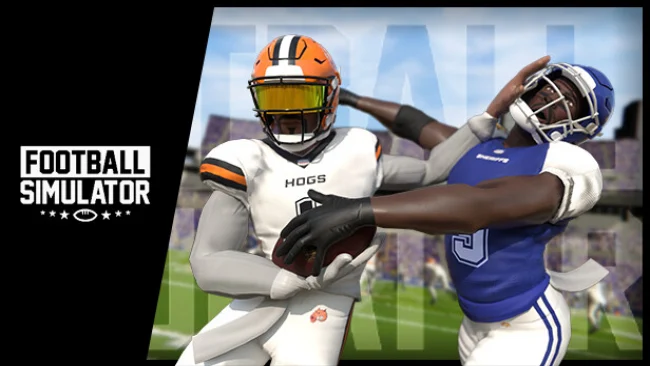
Hard hits, loose balls, and unpredictable deflections define Football Simulator’s take on the gridiron. Rather than leaning entirely on canned outcomes, it aims for a rougher, physics-led style where a broken tackle can become a long run and a tipped throw can still turn into a catch or interception. The mood is more sandbox-like than broadcast-polished, with the action built around chaotic football moments that traditional licensed games often smooth over. It is an indie sports project with big ambitions, focused on making every snap feel less scripted.
On the field, players call plays, run routes, throw passes, carry the ball through contact, and fight for possession when plays break down. Physical interactions are central: defenders can disrupt receivers, runners can push through traffic, and diving attempts matter around contested passes. Local multiplayer is available, while broader online functionality remains in development rather than a finished promise. The game’s most substantial current hook is its modding framework, which lets players alter rosters, uniforms, teams, athletes, and other league details instead of waiting for an annual sequel.
That editable foundation separates Football Simulator from the heavily licensed, tightly controlled approach associated with Madden NFL. Developers position it as an evergreen platform shaped alongside its community, with plans for online exhibitions, leagues, RPG-style career progression, practice and challenge modes, VR support, and even single-position multiplayer. Many of those systems are explicitly planned, so prospective players should judge the present version by its physics-driven matches, couch play, and customization rather than its long-term roadmap. Fans who enjoy moddable sports sandboxes and can tolerate an evolving indie production find the strongest appeal here, while players seeking a fully featured, broadcast-ready football package may prefer to wait for its larger modes to mature.
Screenshots
Installation
- Select the Download button at the top of this page to open UploadHaven.
- On UploadHaven, wait for any countdown, then select Free Download. Optional: UploadHaven Pro for faster downloads.
- When complete, extract the archive to a Football Simulator folder using 7-Zip.
- Open the extracted folder and start the game normally.
- For errors, check Setup Guide & Troubleshooting below. Keep your security software enabled.
System Requirements
- OS: Windows 10
- Processor: Intel i7
- Memory: 16 GB RAM
- Graphics: Nvidia Geforce 1060
Setup Guide & Troubleshooting
How do I fix missing DLL errors for Football Simulator (v0.3ar1)?
After extracting Football Simulator (v0.3ar1), navigate to the _Redist or _CommonRedist folder inside the game directory and install DirectX, Vcredist, and any other dependencies included.
What should I do if the downloaded file is corrupted?
The full archive is 11.00 GB — make sure your download completed fully before extracting. Use 7-Zip to extract the files. If you still see a "file corrupted" error, re-download and try again.
Do I need to run the game as administrator?
Usually, no. Start the game normally from the extracted folder. If you see a permissions or save error, check that the folder is writable and follow the game's documented fix. Only grant administrator access when a trusted game's specific setup requires it.
How do I update my GPU drivers for this game?
The game won't launch — what should I try?
Check that extraction completed and your PC meets the system requirements. Note any error message before choosing a fix. If it identifies a missing runtime, install the required DirectX components or Microsoft Visual C++ Redistributable from Microsoft.
My antivirus is blocking the game — is it safe?
A warning needs to be investigated; the download source alone cannot confirm that a file is safe. Keep your security software enabled and review the detection details. Do not run or restore a flagged file unless you have verified that it is a false positive. If you are unsure, leave it quarantined.