
Game Overview
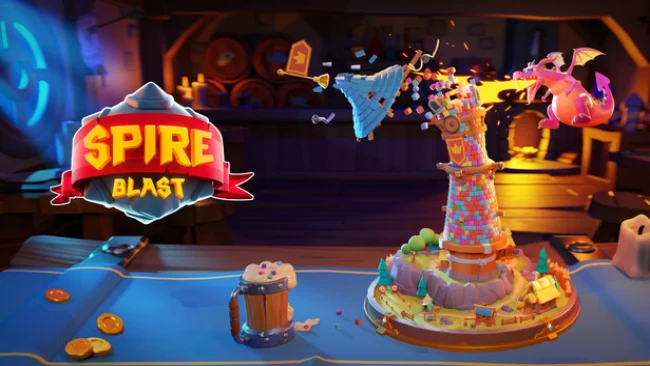
A hungry little dragon and a kingdom full of unstable towers make for an unusually cheerful kind of destruction. Spire Blast is a colorful physics puzzle game built around picking apart tall, brick-built structures until gravity finishes the job. Its fantasy backdrop stays light and friendly, while each collapse delivers the satisfying clatter of a carefully planned chain reaction. The mood is relaxed rather than frantic, but the later puzzles demand considerably more thought than the charming presentation first suggests.
Players fire at groups of matching blocks, removing key sections from each tower and watching the remaining construction shift, tilt, and tumble. Every shot matters because bricks can support entire overhangs, protect awkwardly placed colors, or leave behind pieces that are difficult to reach after a bad collapse. The core loop revolves around reading a structure, choosing the most valuable target, and using limited moves efficiently to clear the stage. New layouts and special brick behaviors steadily complicate the formula, while boosters provide useful ways to break stubborn formations or recover from imperfect planning.
What makes Spire Blast work is the way simple color-matching interacts with real physical balance; it feels less like a standard match puzzle and more like carefully dismantling a toy tower. Bright minimalist scenery, gentle audio, and the dragon’s playful presence make repeated attempts pleasantly low-stress, even when a nearly solved level goes wrong. Fans of Angry Birds’ structural destruction or casual mobile-style puzzle design will immediately understand the appeal, though the emphasis here rests on precision and puzzle efficiency rather than reflexes. It suits newcomers looking for approachable, short-form stages, while completionists and experienced puzzle players can chase cleaner solutions and master increasingly elaborate towers.
Screenshots
Installation
- Select the Download button at the top of this page to open UploadHaven.
- On UploadHaven, wait for any countdown, then select Free Download. Optional: UploadHaven Pro for faster downloads.
- When complete, extract the archive to a Spire Blast folder using 7-Zip.
- Open the extracted folder and start the game normally.
- For errors, check Setup Guide & Troubleshooting below. Keep your security software enabled.
System Requirements
- Requires a 64-bit processor and operating system
- OS: Windows 10 (64-bit versions only), Windows 11 (64-bit versions only)
- Processor: Intel Core i3 @ 2.5GHz or AMD Phenom @ 2.5GHz
- Memory: 4 GB RAM
- Graphics: NVIDIA GeForce GTX 460 or ATI Radeon HD 5850
- DirectX: Version 11
- Storage: 1 GB available space
Setup Guide & Troubleshooting
How do I fix missing DLL errors for Spire Blast?
After extracting Spire Blast, navigate to the _Redist or _CommonRedist folder inside the game directory and install DirectX, Vcredist, and any other dependencies included.
What should I do if the downloaded file is corrupted?
The full archive is 644.69 MB — make sure your download completed fully before extracting. Use 7-Zip to extract the files. If you still see a "file corrupted" error, re-download and try again.
Do I need to run the game as administrator?
Usually, no. Start the game normally from the extracted folder. If you see a permissions or save error, check that the folder is writable and follow the game's documented fix. Only grant administrator access when a trusted game's specific setup requires it.
How do I update my GPU drivers for this game?
The game won't launch — what should I try?
Check that extraction completed and your PC meets the system requirements, including Version 11. Note any error message before choosing a fix. If it identifies a missing runtime, install the required DirectX components or Microsoft Visual C++ Redistributable from Microsoft.
My antivirus is blocking the game — is it safe?
A warning needs to be investigated; the download source alone cannot confirm that a file is safe. Keep your security software enabled and review the detection details. Do not run or restore a flagged file unless you have verified that it is a false positive. If you are unsure, leave it quarantined.